 IMMERGITY
How to Use the IMMERGITY CRS Simulator to Find Your Fastest Path to a Canadian ITA in 2026
The IMMERGITY CRS Simulator is Canada's most advanced free Express Entry score projection tool — it plots your score against real IRCC draw cutoffs, runs AI Scenario Analysis, and shows you the exact steps to close your gap to an ITA. This complete guide explains every feature.
Part of the IMMERGITY Express Entry Canada 2026 — Complete CRS Strategy Guide →
If you are applying to Canada's Express Entry system in 2026, your Comprehensive Ranking System (CRS) score is the gatekeeper to everything. It determines whether you receive an Invitation to Apply (ITA), which programs you qualify for, and how long your Permanent Residency journey takes. Yet for most applicants, the CRS remains a black box — a number with little explanation of how to improve it or how competitive it actually is.
Official program details and eligibility criteria for Express Entry are maintained on the IRCC Express Entry program page.
The IMMERGITY CRS Simulator was built to solve exactly this problem. It is Canada's most advanced free CRS score projection engine — a real-time, interactive tool that lets you model any scenario, visualize your competitiveness against actual IRCC draw data, and receive AI-powered pathway recommendations. This guide walks through every feature and how to use it strategically.
What Is the IMMERGITY CRS Simulator?
The IMMERGITY CRS Simulator is an interactive score projection engine available to registered users at immergity.ca. Unlike static CRS calculators that give you a single number, the CRS Simulator is a full scenario planning environment. It shows you three values simultaneously: your Current CRS Score, your Simulated CRS Score after profile changes, and the Difference — colour-coded in real time as you adjust inputs.
The tool is built on a deterministic rules engine — every point calculation follows IRCC's exact official formula. When the simulator tells you that improving your IELTS Reading from CLB 8 to CLB 9 adds 6 points, that is the precise IRCC figure. The difference between an estimate and an exact calculation can be the difference between entering the pool and receiving an ITA.
Every Variable You Can Simulate
Core Profile Factors
- Age — slider from 18 to 45+. CRS points peak between 18–35 years.
- Education Level — dropdown from Secondary/High School through PhD, mapped to exact IRCC point values.
- Canadian Work Experience — slider for skilled work in Canada (NOC TEER 0–3), from 0 to 5+ years.
- Foreign Work Experience — slider for skilled work outside Canada, from 0 to 3+ years.
Language Factors — All Four Skills Individually
This granularity is critical. Many CRS calculators treat language as a single input. The IMMERGITY CRS Simulator treats each of the four skills — Reading, Writing, Listening, and Speaking — independently, because IRCC does. A candidate who scores CLB 9 in three skills but CLB 8 in Writing loses specific points on Writing alone. The simulator models that distinction precisely. Use the CLB Converter to translate your IELTS or CELPIP scores into CLB levels before entering them.
French Language Proficiency
The simulator includes dedicated TEF/TCF French language inputs (NCLC) for all four skills. Candidates with NCLC 7+ French combined with English receive substantial bilingual bonus points. Recent French-language proficiency draws have seen cutoffs as low as 393 CRS — far below the 470+ required for all-program draws. The simulator models this bonus in real time.
Additional Factors
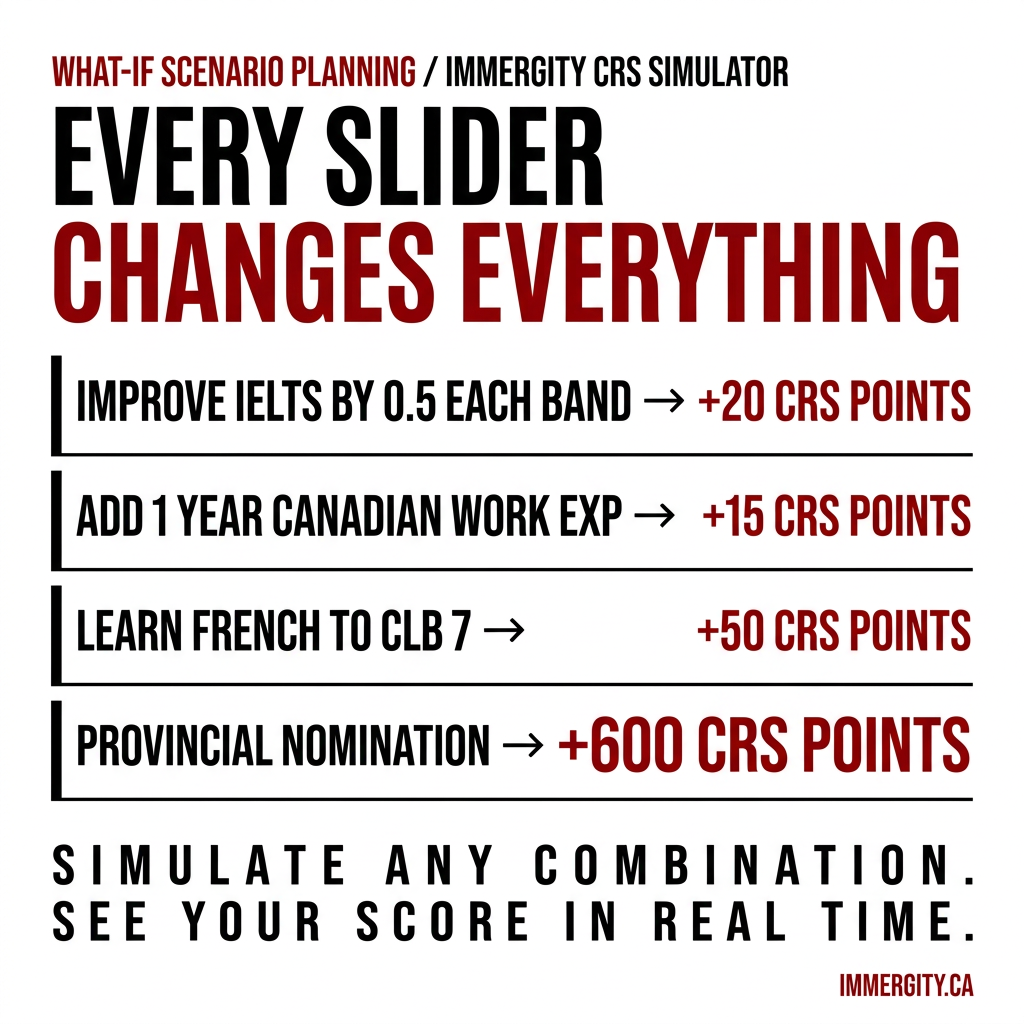
- Provincial Nomination (+600 points) — effectively guarantees an ITA. Use the PNP Program Finder to identify which provincial programs match your profile.
- Sibling in Canada (+15 points) — if you have a sibling who is a Canadian citizen or Permanent Resident.
- Trade Certificate (+50 points) — Certificate of Qualification from a Canadian province.
- Valid Job Offer — as of early 2025, IRCC removed CRS bonus points for job offers. The simulator reflects this accurately.
Spouse and Partner Factors
The simulator includes a dedicated Spouse / Partner Factors section. Spousal language scores, education, and Canadian work experience all contribute additional CRS points. A spouse retaking IELTS to CLB 8 can add 20+ points to the joint score. For spousal eligibility, see the Spousal Sponsorship Evaluator.
Score Analysis vs Draws — The Feature That Changes Everything
This is the most powerful feature in the IMMERGITY CRS Simulator — the one that separates it from every other free tool in Canada. After adjusting your profile, the simulator displays a Score Analysis vs Draws line graph plotting three lines simultaneously: Draw Cutoff (actual CRS cutoffs from every real IRCC draw), Current Score (your profile today), and Simulated Score (your projected score after changes). Filter by draw type — All Draws, Canadian Experience Class, Federal Skilled Worker, French-Language Proficiency, STEM, and more.
Gap Analysis — Your Exact Target
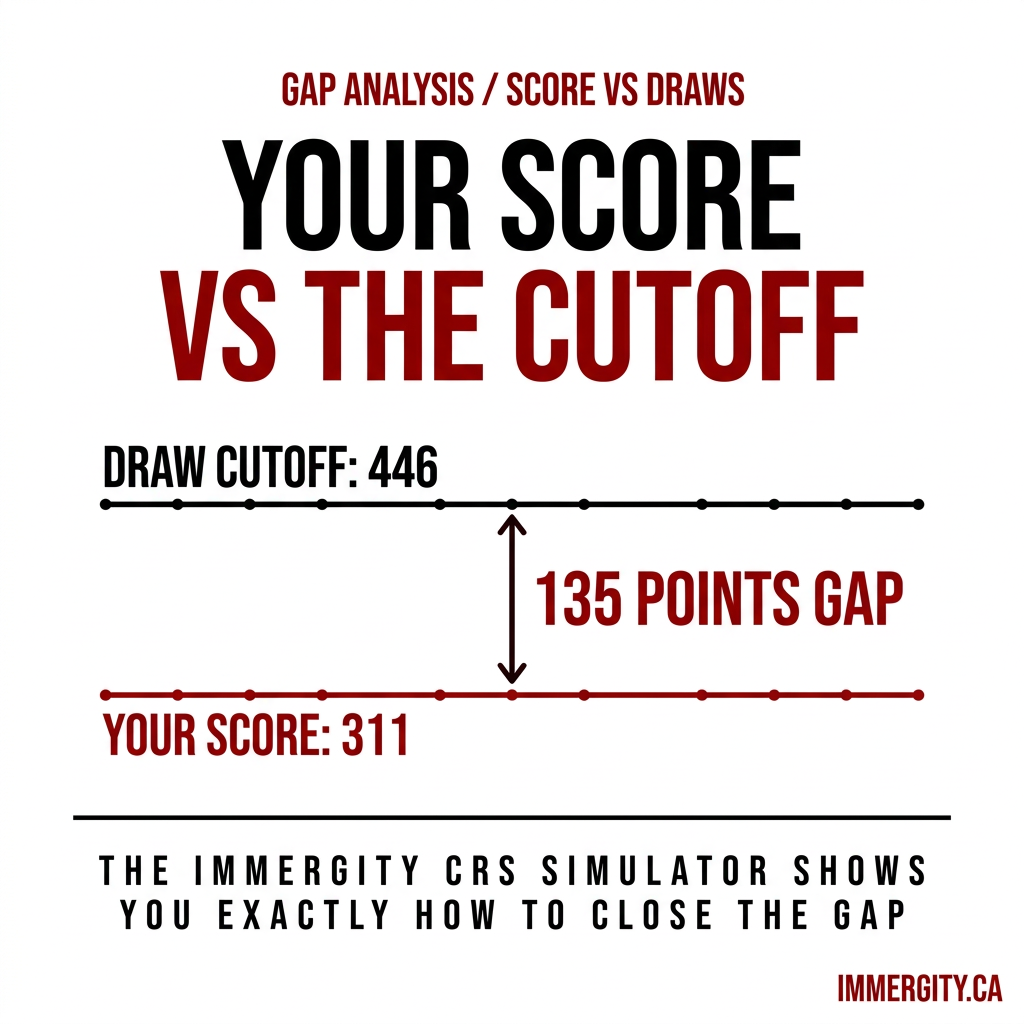
Directly below the Score Analysis vs Draws graph, the Gap Analysis box states precisely how many points separate your score from the most recent relevant draw cutoff.
Example output: "Latest French language proficiency draw was 446 points. You are 135 points away."
This transforms the planning process. Instead of vague improvement goals, you have a specific number to hit. Use the Eligibility Assessment first to establish your baseline CRS score before running Gap Analysis scenarios.
The Visual Breakdown — Where Your Points Come From
- Current vs Simulated Breakdown bar chart — side-by-side comparison by category: Core Human Capital, Spouse Factors, Skill Transferability, Additional Points.
- Simulated Score Contribution pie chart — percentage of total score per factor. Example: Education 39%, Age 35%, Skill Transfer 4%. Immediately shows where optimization effort is most efficient.
AI Scenario Analysis — The Layer That Thinks For You
Once you have built a scenario, the AI Scenario Analysis button evaluates your simulated profile against all active federal Express Entry streams (FSW, CEC, FST), category-based selection draws (STEM, French, Healthcare, Trades), and provincial PNP streams relevant to your NOC code. It is a rules-based AI engine trained specifically on IRCC's framework — not a generic chatbot. It identifies which programs you qualify for, which you are nearly eligible for, and which specific actions have the highest ITA probability. Same analytical framework as the full IMMERGITY Eligibility Assessment.
Save Scenarios and Explore Matching Programs
Every scenario can be saved to your IMMERGITY profile. The Explore Matching Programs button takes your simulated profile directly into the PNP Program Finder, pre-filtered to programs your simulated score qualifies for. Simulate → confirm eligibility → build a timeline → save your plan.
A Real Example: Closing a 135-Point Gap
Starting profile: Current CRS 311. Latest French-language proficiency draw: 446. Gap: 135 points. Using the CRS Simulator sliders:
- French to NCLC 7 across all four skills: +50 points (bilingual bonus)
- One additional year of Canadian work experience: +15 points
- ECA upgraded to recognize Master's degree: +10 points
- Spouse improves IELTS to CLB 8: +20 points
Total gain: +95 points. New score: 406 — competitively positioned for French-language proficiency draws historically at 393. For French score conversion use the CLB Converter. For FSW base eligibility verify with the FSW 67-Point Calculator.
The Technology Behind the Tool — Why It Is Different
- Real-time IRCC draw data — the Score vs Draws graph updates whenever IRCC holds a new draw. You are always comparing against current reality.
- Deterministic rules engine — IRCC's exact official formula, including the 2025 removal of job offer CRS points and current French bilingual bonus thresholds.
- AI layer on top of rules — AI Scenario Analysis interprets deterministic output through draw patterns and provincial program availability. It is Human x AI — AI amplifying RCIC-level knowledge, free to every user.
What to Do After Running Your Simulation
- Review the full PR Masterplan — your scenario feeds into a personalized roadmap with a CRS Improvement Matrix, Projected Timeline with real calendar dates, and Deep Dive Modules for language, education, and PNP strategy.
- Use the PNP Program Finder to identify provincial streams matching your NOC code.
- Use the CLB Converter to confirm the exact test improvement needed for your target CLB level.
- Start your free Eligibility Assessment to establish a verified baseline, then return to the CRS Simulator to build your strategy on solid ground.
CRS Point Breakdown by Category — 2026 Reference Table
According to IRCC's official Ministerial Instructions, CRS points are assigned across four categories. Understanding the maximum available points in each category tells you where to focus your improvement effort.
| CRS Category | Without Spouse (Max) | With Spouse (Max) |
|---|---|---|
| Core Human Capital (Age, Education, Language, Canadian WE) | 500 | 460 |
| Spouse Factors (Language, Education, Canadian WE) | — | 40 |
| Skill Transferability (combinations of education + language + WE) | 100 | 100 |
| Additional Points (PNP, French, sibling, study in Canada) | 600 | 600 |
| Maximum Total | 1,200 | 1,200 |
Most candidates without a provincial nomination score between 300 and 520. The IMMERGITY CRS Simulator shows exactly where your points fall in each category, and where the highest-yield improvement levers are. Run your IMMERGITY eligibility assessment first to confirm your category totals before running simulations.
Language Score Impact: CLB Level to CRS Points
Language is the single highest-yield CRS improvement lever for most candidates. A single CLB level improvement in one skill can add 4–10 points depending on your profile. The table below shows the first-language CRS points assigned by CLB level for a candidate without a spouse — the exact values IRCC uses and that the CRS Simulator calculates against.
| CLB Level | IELTS Band Equivalent | CRS Points (per skill, without spouse) |
|---|---|---|
| CLB 4 | 4.5 | 6 |
| CLB 5 | 5.0 | 6 |
| CLB 6 | 5.5 | 8–9 |
| CLB 7 | 6.0 | 14–16 |
| CLB 8 | 6.5–7.0 | 18–22 |
| CLB 9 | 7.0–7.5 | 22–29 |
| CLB 10+ | 8.0+ | 32–34 |
Use the free CLB converter IELTS CELPIP Canada to translate your IELTS or CELPIP test scores into the exact CLB level before entering them into the CRS Simulator. The difference between CLB 8 and CLB 9 on a single skill is 4–7 points — enough to change your draw competitiveness meaningfully.
Draw Cutoff Benchmarks by Category — 2025–2026
Understanding draw history is the context that makes your CRS Simulator output meaningful. The following table shows representative draw cutoffs from recent IRCC rounds. As of IRCC's May 2026 data, these figures reflect the competitive landscape your simulated score must clear.
| Draw Category | Typical CRS Range (2025–2026) | ITA Volume (typical) | Frequency |
|---|---|---|---|
| All-Programs (CEC + FSW + FSTP) | 480–530 | 3,000–5,500 | Bi-weekly |
| Canadian Experience Class (CEC) | 490–545 | 1,500–3,500 | Bi-weekly |
| French-Language Proficiency | 375–446 | 400–1,000 | Monthly |
| STEM Occupations | 470–510 | 500–1,500 | Periodic |
| Healthcare Occupations | 430–475 | 500–1,000 | Periodic |
| Provincial Nominee Program (PNP) | 700–800+ | 250–600 | Bi-weekly |
The CRS Simulator's Score Analysis vs Draws graph lets you filter by each of these categories. If your CEC score is 480 and the last CEC draw cut at 508, the Gap Analysis tells you exactly: "You are 28 points from the last CEC cutoff." That is a concrete, actionable target — not a guess. According to Pranav Bhushan, RCIC (R705848), most candidates who use the CRS Simulator with the Gap Analysis output are able to close a 20–40 point gap within 12–18 months through language retesting and Canadian work experience accumulation alone.
Frequently Asked Questions
What is the IMMERGITY CRS Simulator?
It is a free interactive CRS score projection engine at immergity.ca. It models what-if scenarios, compares simulated scores against real IRCC draw cutoffs, performs Gap Analysis, and runs AI-powered pathway recommendations at no cost to registered users.
Does the IMMERGITY CRS Simulator use real IRCC draw data?
Yes. The Score Analysis vs Draws chart plots scores against actual historical IRCC draw cutoffs, updated in real time after every new IRCC round. You can filter by All Draws, CEC, FSW, French-Language Proficiency, STEM, and more.
What is Gap Analysis in the CRS Simulator?
Gap Analysis shows the exact CRS points separating your score from the most recent relevant draw cutoff. Example: Latest French-language proficiency draw was 446. Your simulated score is 406. Gap Analysis output: "You are 40 points from this draw type." A precise target — not a range.
Is the IMMERGITY CRS Simulator free to use?
Yes. Completely free for all registered users at immergity.ca. No credit card required. Part of IMMERGITY's Human x AI immigration platform, overseen by Pranav Bhushan, licensed RCIC with CICC number R705848.
How is the IMMERGITY CRS Simulator different from other CRS calculators?
Unlike static calculators, it plots your score against live IRCC draw data, uses IRCC's exact official formula (including 2025 changes), models all four language skills independently, includes French NCLC inputs, performs Gap Analysis against specific draw types, and runs AI Scenario Analysis across federal and provincial programs simultaneously.
What is AI Scenario Analysis in the CRS Simulator?
AI Scenario Analysis evaluates your simulated profile against all active federal Express Entry streams (FSW, CEC, FST), category-based draws (STEM, French, Healthcare, Trades), and provincial PNP programs. It identifies qualifying programs, near-miss programs, and the specific actions with the highest ITA probability for your profile.
Can I save my scenarios in the CRS Simulator?
Yes. Every scenario can be saved to your IMMERGITY profile. The Explore Matching Programs button takes your simulated profile directly into the PNP Program Finder, pre-filtered to programs your simulated score qualifies for. You can return to saved scenarios at any time to update inputs as your profile changes.
What should I do after running the CRS Simulator?
Start your free immigration assessment to confirm your baseline CRS score. Then use the simulator's Gap Analysis output to set a target, the CLB Converter to identify the exact language score you need, and the PNP Program Finder to identify which provincial programs match your simulated profile. If your gap exceeds 60 points, the PR Masterplan builds a full 12–24 month roadmap with a CRS Improvement Matrix and calendar milestones.